
Introduction RTE (Runtime Environment) in AUTOSAR
Modern automotive systems contain hundreds of software components distributed across multiple Electronic Control Units (ECUs). Managing communication between these components while ensuring portability, scalability, and maintainability is a significant challenge. AUTOSAR (AUTomotive Open System ARchitecture) addresses this challenge through a layered architecture, and at the heart of this architecture lies the Runtime Environment (RTE) in AUTOSAR.
The AUTOSAR Runtime Environment acts as a middleware layer that enables seamless communication between application software components and the underlying Basic Software (BSW). It provides a standardized interface that allows software components to remain independent of hardware and ECU-specific implementations.
This article provides a comprehensive understanding of AUTOSAR RTE, its architecture, functionality, communication mechanisms, generation process, and practical significance in automotive software development.
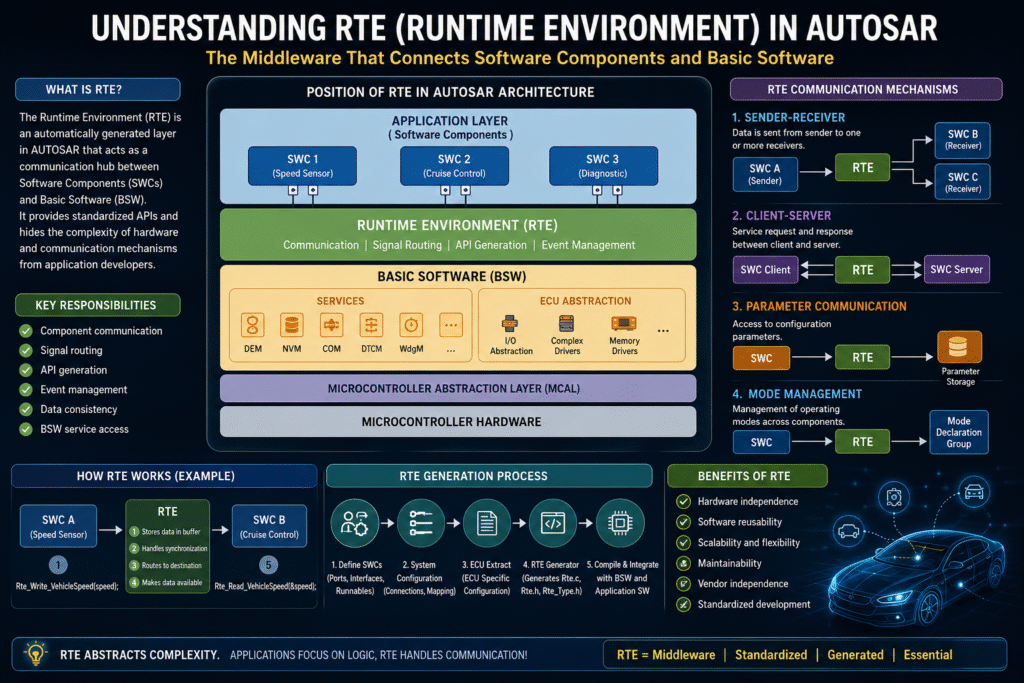
What is RTE in AUTOSAR?
The Runtime Environment (RTE) is an automatically generated software layer in AUTOSAR that acts as a communication hub between:
- Software Components (SWCs)
- Basic Software (BSW)
- Other Software Components
- ECU Hardware Abstraction
The RTE ensures that application software components do not need to know where data originates or where it is consumed. Instead, components interact through standardized APIs generated by the RTE.
In simple terms:
RTE = Middleware that connects AUTOSAR Software Components with each other and with the Basic Software.
Position of RTE in AUTOSAR Architecture
The AUTOSAR layered architecture can be represented as:
+--------------------------------+
| Application Layer              |
| (Software Components - SWCs)   |
+--------------------------------+
| Runtime Environment (RTE)      |
+--------------------------------+
| Basic Software (BSW)           |
| - Services                     |
| - ECU Abstraction              |
| - MCAL                         |
+--------------------------------+
| Microcontroller Hardware       |
+--------------------------------+
The RTE acts as the central communication layer between the application layer and the basic software stack.
Why is RTE Needed?
Before AUTOSAR, application software was often tightly coupled with hardware and communication mechanisms.
This caused problems such as:
- Poor software reusability
- Difficult ECU migration
- High maintenance costs
- Vendor dependency
RTE solves these issues by providing:
Hardware Independence
Application software does not directly access hardware.
Software Portability
Components can be moved to another ECU with minimal changes.
Standardized Communication
All communication follows AUTOSAR-defined interfaces.
Component Isolation
SWCs interact through ports rather than direct function calls.
Scalability
Large systems can be developed by multiple teams independently.
Key Responsibilities of RTE
The Runtime Environment performs several critical tasks:
1. Component Communication
Facilitates communication between software components.
Example:
Speed Sensor SWC
       |
       |
      RTE
       |
       |
Cruise Control SWC
The receiving component does not know where the data originated.
2. Signal Routing
Routes signals between:
- Same ECU components
- Different ECU components
- BSW services
3. API Generation
Generates APIs based on AUTOSAR configuration.
Example:
Std_ReturnType Rte_Read_VehicleSpeed(uint16* speed);

Std_ReturnType Rte_Write_BrakeStatus(boolean status);
Developers use these APIs without worrying about underlying implementation details.
4. Event Management
Triggers runnable entities when specific events occur.
Examples:
- Timer events
- Data reception events
- Mode switch events
- Operation invocation events
5. Data Consistency
Ensures safe and synchronized data exchange between software components.
RTE Communication Concepts
To understand RTE, it is important to understand AUTOSAR communication concepts.
Software Components (SWCs)
An SWC is a modular software unit containing application logic.
Examples:
- Engine Control SWC
- Door Control SWC
- Climate Control SWC
Each SWC communicates using ports.
Ports
Ports are communication endpoints.
Two major types:
Provided Port (P-Port)
Provides services or data.
Example:
Temperature Sensor
      P-Port
Required Port (R-Port)
Consumes services or data.
Example:
Cooling Controller
      R-Port
Interfaces
Ports use interfaces to define communication contracts.
Example:
TemperatureInterface
Defines:
- Data types
- Operations
- Signals
Communication Mechanisms Supported by RTE
AUTOSAR RTE supports multiple communication styles.
1. Sender-Receiver Communication
Used for data exchange.
Example:
Speed Sensor ----> Vehicle Speed
Characteristics:
- Asynchronous
- One-to-many communication
- Data-oriented
Generated APIs:
Rte_Read_VehicleSpeed();

Rte_Write_VehicleSpeed();
Applications:
- Vehicle speed
- Engine RPM
- Temperature values
2. Client-Server Communication
Used for service requests.
Example:
Client ---> Service Request
Server ---> Response
Similar to function calls.
Generated APIs:
Rte_Call_DiagnosticService();
Applications:
- Diagnostics
- Memory services
- Calibration services
3. Parameter Communication
Used for configuration parameters.
Example:
Rte_Prm_MaxSpeedLimit();
Applications:
- Calibration constants
- Configuration values
4. Mode Management Communication
Used for operating modes.
Example modes:
- Normal
- Sleep
- Startup
- Shutdown
Generated APIs:
Rte_Mode_OperatingMode();
Runnables and RTE
A runnable is the smallest executable unit inside a software component.
Example:
void CalculateVehicleSpeed(void)
{
   // Application logic
}
RTE controls when runnables execute.
Runnable Triggering Events
Timing Event
Executed periodically.
Example:
Every 10 ms
Data Received Event
Triggered when new data arrives.
Example:
New speed value received
Operation Invoked Event
Triggered by client-server calls.
Mode Switch Event
Triggered during mode transitions.
RTE Generation Process
One of the most important AUTOSAR concepts is that the RTE is not manually written.
It is automatically generated.
Step 1: Define Software Components
Engineers create:
- Ports
- Interfaces
- Runnables
Using AUTOSAR authoring tools.
Step 2: System Configuration
Configure:
- ECU mapping
- Connections
- Communication paths
Step 3: ECU Extract
Generate ECU-specific configuration.
Step 4: RTE Generator
The RTE generator creates:
Rte.c
Rte.h
Rte_Type.h
and other supporting files.
Step 5: Compile and Integrate
Generated RTE is compiled together with:
- Application software
- Basic software
Internal Working of RTE
When one component writes data:
Rte_Write_VehicleSpeed(speed);
The RTE:
- Stores data in buffers.
- Handles synchronization.
- Routes data to destination components.
- Makes data available through read APIs.
Receiving component:
Rte_Read_VehicleSpeed(&speed);
The entire communication path is hidden from application developers.
RTE and Basic Software Interaction
The RTE also allows SWCs to access BSW services.
Examples:
NVRAM Manager
Rte_Call_NvM_WriteBlock();
Diagnostic Event Manager
Rte_Call_Dem_ReportErrorStatus();
Watchdog Manager
Rte_Call_WdgM_CheckpointReached();
Thus, RTE provides a uniform interface to AUTOSAR services.
Types of RTE Communication
Intra-ECU Communication
Communication between components located on the same ECU.
Example:
SWC A ---> RTE ---> SWC B
Fast and memory-based.
Inter-ECU Communication
Communication across ECUs.
Example:
SWC A
  |
 RTE
  |
 COM
  |
 CAN/Ethernet
  |
 COM
  |
 RTE
  |
 SWC B
The application software remains unaware of network details.
Advantages of AUTOSAR RTE
Reusability
SWCs can be reused across projects.
Hardware Independence
Application code remains hardware-agnostic.
Vendor Independence
Supports multi-vendor development.
Maintainability
Changes in communication mechanisms do not affect application logic.
Scalability
Suitable for both small and large automotive systems.
Standardization
Provides a common development methodology across the automotive industry.
Challenges and Limitations
Despite its advantages, RTE introduces some challenges.
Increased Complexity
AUTOSAR architecture requires extensive configuration.
Memory Overhead
Generated code may consume additional memory.
Performance Overhead
Extra abstraction layers can introduce latency.
Tool Dependency
RTE generation depends heavily on AUTOSAR toolchains.
Practical Example
Consider an Adaptive Cruise Control system.
Software Components
- Speed Sensor SWC
- Distance Sensor SWC
- Cruise Control SWC
Data Flow
Speed Sensor
      |
      |
     RTE
      |
      |
Cruise Control

Distance Sensor
      |
      |
     RTE
      |
      |
Cruise Control
The Cruise Control component reads both inputs through RTE APIs:
Rte_Read_VehicleSpeed();

Rte_Read_DistanceToVehicle();
It does not know whether the data comes from local memory, CAN communication, or another ECU.
Difference Between RTE and Operating System
| Feature | RTE | AUTOSAR OS |
|---|---|---|
| Purpose | Communication | Task Scheduling |
| Focus | Data Exchange | Execution Management |
| Generated | Yes | Mostly Configured |
| Handles SWC Communication | Yes | No |
| Handles Task Scheduling | No | Yes |
The OS schedules tasks, while the RTE enables communication between software entities.
Conclusion
The Runtime Environment (RTE) is one of the most important building blocks of AUTOSAR. It serves as the middleware layer that decouples application software from hardware and communication details. By providing standardized APIs, automatic code generation, and transparent communication mechanisms, the RTE enables reusable, scalable, and maintainable automotive software architectures.
Whether data is exchanged within the same ECU or across multiple ECUs over CAN, LIN, FlexRay, or Ethernet, the RTE hides the complexity from application developers. This abstraction is a key reason why AUTOSAR has become the de facto standard for modern automotive software development.
Understanding the RTE is essential for any AUTOSAR developer because almost every software component interacts with the system through this crucial layer. Mastering its concepts provides a strong foundation for advanced topics such as COM Stack, BSW Services, ECU Configuration, Diagnostics, and AUTOSAR Adaptive Platform development.
Read My other Blogs
- Understanding RTE (Runtime Environment) in AUTOSAR
- The Growing Importance of Cybersecurity in Automotive Industry
- The Internet of Things (IoT): The Connected World
- Understanding the COM Stack in AUTOSAR: A Comprehensive Guide
- Understanding AUTOSAR Architecture: A Guide to Automotive Software Integration
- Flash Over-the-Air (FOTA) Updates: Revolutionizing Vehicle Software
- Drive By Wire Technology in Automotive
- MCAL layer in Autosar
- What is Autosar?
- Top 30+ Automotive Interview Questions (2024)